






























Computer mice have taken plenty of unusual forms over the years. Now, one of the most interesting alternatives skips your hands altogether.
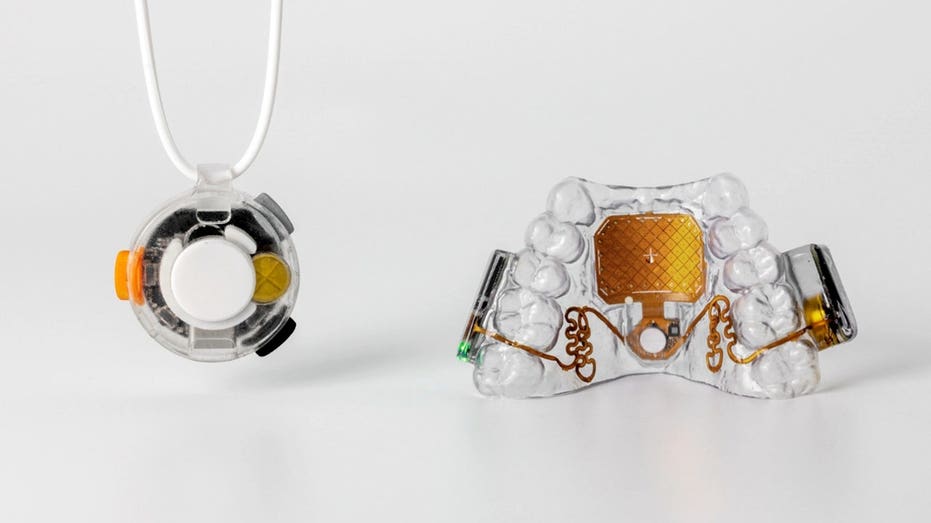
San Francisco-based Augmental Technologies has developed the MouthPad, a custom-fit touchpad that sits inside your mouth and lets you control a computer, smartphone or tablet using your tongue or head. The company describes it as the world's first hands-free touchpad.
It looks a little like a slim dental retainer. However, tucked inside is technology designed to turn subtle movements into cursor control. The concept has an important purpose. Augmental developed MouthPad to give people with limited mobility another way to interact with everyday technology. The company says it worked with hundreds of users with different abilities while developing the device. So how do you actually control a computer with your mouth, and what is it like to use? Here's how MouthPad works.
New! Free live CyberGuy class: Protect Your Money From Today’s Biggest Threats
Join us Saturday, August 29, at 10 AM ET for a free CyberGuy LIVE class covering five simple steps to help defend yourself against AI scams, fraud, identity theft and financial hacks. Kurt "CyberGuy" Knutsson will explain how to set up bank alerts, strengthen your account logins, protect your phone number, freeze your credit and help secure your retirement savings against unauthorized transfers. No technical experience is needed. You’ll also receive our financial protection checklist, and every registrant will get a link to the class recording afterward.
Reserve your free spot today at CyberGuyLive.com.
COULD A PAINT-ON ELECTRONIC TATTOO SPOT HEART ATTACKS?
MouthPad sits over your upper teeth, with a pressure-sensitive touchpad positioned against the roof of your mouth. Move your tongue across the touchpad, and you can move the cursor. You can also use head movements instead. Tongue presses can perform a left-click or click-and-drag, while a sip gesture can trigger a right-click. MouthPad also supports scrolling and swiping. So, once you get used to the controls, your tongue effectively takes over many of the jobs normally handled by your fingers on a mouse or trackpad. The device connects wirelessly like a Bluetooth mouse. That means you do not need a special receiver sticking out of your computer.
Compatibility is one of MouthPad's more useful features. Augmental lists support for macOS, Windows, Linux, iOS and Android. The companion app is available for macOS, Windows and iOS. You can also pair MouthPad with multiple devices and switch between them. Inside the companion app, you can adjust settings such as cursor speed, touch sensitivity and click strength. You can also change scrolling behavior. Those preferences are stored on the MouthPad itself, allowing you to move between compatible devices without starting your setup from scratch.
That was one of my first questions. According to Augmental, MouthPad's custom design minimizes its impact on speech. The company says users can speak or use voice-recognition software while wearing it. However, Augmental also acknowledges that results vary. Some people may need more time to adjust to speaking normally with the device in their mouth. Comfort will vary too. Augmental says team members and early users have worn MouthPad for as long as 10 hours in a day. Still, the company notes that comfort depends on factors including the shape of your mouth and how you use the device. The MouthPad itself weighs about 10 grams and measures roughly 1 mm thick. It is made from dental resin.
Augmental rates the battery for more than seven hours of continuous use. Charging takes about 1.5 hours, and the MouthPad comes with its own charging case plus a USB cable. The company also sells a two-device package. That option gives one person a backup MouthPad so they can swap devices when one needs charging.
3 THINGS TO AVOID IN MIDDLE AGE COULD MEAN 13 MORE YEARS WITHOUT DEMENTIA, STUDY FINDS
You cannot simply order a MouthPad and start using it when the package arrives. Every MouthPad is custom-fitted. After ordering, you need an intraoral 3D scan from a dentist or local scanning provider. Augmental then uses that scan to manufacture your device. The company says most providers charge between $50 and $150 for the scan. Augmental says it ships the finished MouthPad about six months after receiving the scan. Once it arrives, you use the company's online platform for configuration and a one-time calibration.
Augmental says MouthPad is best suited for people over 18 who have enough tongue dexterity to operate it. The company also recommends good oral health and says candidates should not be undergoing active dental or orthodontic treatment. You also need to be able to open your mouth wide enough for the initial 3D scan. The device has already attracted interest beyond its original accessibility mission. According to the information provided, more than 6,300 people were on the waitlist. That includes people with disabilities as well as professionals interested in controlling devices while keeping their hands available for other work.
Something that lives in your mouth obviously needs regular cleaning. Augmental says you should wash the MouthPad by hand with soap and water before and after each use. You should dry it before putting it back into its charging case. You can drink water while wearing it. However, Augmental says you should remove the device before eating, drinking anything else or sleeping. Hot liquids can affect its fit. You also should not bite or chew the MouthPad because doing so could damage it and void the warranty.
The MouthPad currently costs $1,400 for one custom-fit device. A two-device package for the same user costs $1,900. Augmental says the second device can serve as a backup and help extend your usable time between charging sessions. There is another cost to consider. The dental scan is separate. MouthPad is also not currently covered by insurance, FSA or HSA funds, according to Augmental. For now, Augmental only sells and ships MouthPad to addresses in the United States. However, the company says the device itself is not geo-restricted and can be used outside the country.
MouthPad shows how accessibility technology can rethink something as basic as controlling a cursor. For someone who cannot comfortably use a traditional mouse or touchscreen, the ability to navigate a phone or computer with subtle mouth movements could provide another route to independence. There are limitations to consider. At $1,400 plus the cost of a dental scan, MouthPad represents a significant investment. You also have to wait for a custom device to be manufactured, and insurance does not currently cover it. Still, the technology itself is fascinating because Augmental built it around a part of the body most computer designers have largely ignored: the tongue. And MouthPad may only be the beginning. Augmental is also developing Vox, a wearable microphone that detects quiet speech through vibrations in the body. The company envisions Vox handling dictation while MouthPad handles cursor control.
IS YOUR SOCIAL SECURITY NUMBER ON THE DARK WEB?
What catches my attention about MouthPad is not simply that you can control a computer with your tongue. It is why someone would need to. Most of us grab a mouse, tap a screen or open an app without thinking about the physical movements involved. For someone with limited use of their hands, those same actions can become major barriers. MouthPad approaches that problem from a completely different direction. The price will put it out of reach for some people, and the custom fitting process takes commitment. Still, seeing a device move from years of development into something consumers in the U.S. can actually order is an important milestone for hands-free computing. Technology becomes far more interesting when it gives someone an ability they did not have before.
Would you be comfortable controlling your phone or computer with a device inside your mouth? Let us know by writing to us at Cyberguy.com.
Sign up for my FREE CyberGuy Report
Copyright 2026 CyberGuy.com. All rights reserved.
The post MouthPad lets your tongue control a computer appeared first on FOX News